Complementing an AI Agent with deterministic tooling using SWAMP
In my very first experiments with AI agents, I wanted to manipulate many rows in CSV files. I learned pretty quickly that rather than asking the agent to make the change, you’re better off asking it to write a script to do it, and then running the script. This has many advantages: it’s easier to inspect and validate the logic, make refinements (either with the agent or manually), iterate on the logic as needed, save it for reuse on other files, and ensure the exact same operation is applied across all rows. As a bonus, for non-trivial workloads it also tends to go faster and use far fewer tokens.
Turns out that however good LLMs are at reasoning tasks, for deterministic (and larger-scale) changes, traditional code works better. My first self-taught lesson with agents was: don’t use it for everything, certainly not to replace traditional code. Code and LLMs can be very complementary, and soon after, agents started automatically generating scripts and running them.
Introducing SWAMP
When you take this idea of moving the deterministic logic out of an agent and into scripts and develop it further into a refined, comprehensive system that can be used by individuals or by teams, what do you get? The authors of SWAMP may explain it differently, but I think of SWAMP as exactly that.
Swamp has extensive docs, but these are quite dense. Let me paraphrase, simplify, and explain what it really boils down to (IMHO).
Swamp first helps you build deterministic scripts (using your agent). You can run the scripts on a plain old CLI, but if you run them via an agent, the agent becomes “reasoning glue” around the scripts. Either way, Swamp tracks all input and output data into a robust repository, and the agent context only gets what it needs.
Specifically:
- Swamp deploys skills, so your agent helps you factor out pieces of work into reusable Swamp “models” which have methods, just like classes in OOP. These are glorified scripts, implemented in TypeScript. Swamp bundles various quality checks, which force the agent to improve the code until it’s good enough. One of them is an “adversarial review”: essentially a second persona that picks apart the code and makes your agent do a better job. See this code. You can manually intervene as well, but in my experience, you don’t really need to - certainly not for personal projects, where the agents have become incredibly good.
- Swamp lets you instantiate these models and call the methods. Like objects in OOP, you can just use them without needing to read the class’s code. If you have the agent do it for you, it does not need to load any code into its context, saving tokens.
- Traditionally, you call a script and its output goes to stdout or a file. Agents will typically use
grep,sed, or similar tools to select the pieces of output they need, which is pretty token-efficient. But Swamp does something a bit different: theswampCLI tool wraps the script and automatically collects and stores output data in a repository, neatly organized by model, method invocation, version, etc. You can query and inspect the data and reuse it in other invocations, or load some of the data into your agent context window if you want to. This is a bit more organized and allows for easier auditing and the like. It does mean Swamp needs to teach the agent how to select the data it needs by loading a skill into the context. - You can feed output from one model into another and construct entire workflows. You don’t even need an AI agent; you can just run these workflows as a CLI command.
- Swamp has a public repository where people can contribute and share useful models. The most popular ones now are for system administration, S3, etc. But there’s also stuff for managing your music library, Flipper Zero management, workout tracking, and managing your baby’s diaper schedule.
- Swamp ships a bunch of skills that guide you and your agent through all of the functionality. This works incredibly well. It holds your hand from start to finish.
- It also has various features for enterprises, larger-scale uses, vaults, etc.
Use cases
The above was a bit theoretical. More people are writing about their use cases (and here’s an interesting CI one), but it’s certainly not limited to sysadmin and software development stuff.
I use Swamp models and workflows for:
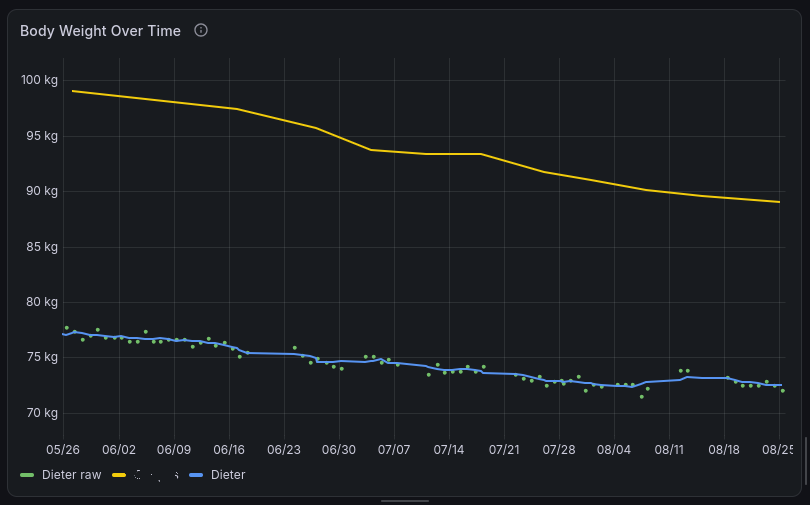
- tracking a weight loss journey with a friend. One model extracts my weight data from body.build as CSV, while another extracts my friend’s data from my second brain, Logseq. Several calls to methods on the Grafana model then download, patch, and update a private Grafana Cloud dashboard where we can track our progress.
- extracting location clues out of various sources such as GPX coordinates in my Google Photos, constructing a location history, and making sure I comply with tax laws (which count the number of days spent in a country, etc.).
- managing a Raspberry Pi and querying Prometheus (Swamp helpfully made an extension for this) and managing a local Grafana dashboard (using this extension). I have a local monitoring setup and am troubleshooting an internet issue. Offloading the grunt work to code (Swamp models) and leaving reasoning to the agent works incredibly well. The two work hand in hand to help me build a detailed diagnostics report. Today I have Codex drive Ansible, but may switch that to Swamp as well for more graceful handling of config drift.
All of these seem kind of random, but I guess that’s the point: you can use Swamp for anything! I suspect I will probably start using it for more and more random things.
All of this was built on autopilot. I wouldn’t say vibe coding because it uses Swamp quality checks, adversarial reviews, etc., to ensure a decent level of quality (certainly higher than what I would have cobbled together for my hobby projects in the pre-AI days!).
The confusing bits
If you decide to check out Swamp, I just want to make you aware of some confusing bits:
- I don’t know why it’s called a “club”. There’s nothing exclusive about it. It’s a great open source devtool that anyone can download and use.
- It creates public user profiles (here’s mine - these look very “gamer”-y) and puts them on an undocumented leaderboard. None of this is relevant to using it. I think it’s hooked up to telemetry sent from the CLI tool, which I suppose is a way to gamify the experience and encourage more usage, but this can all be ignored. You can disable telemetry, but I haven’t bothered.
- There’s some very interesting content surrounding Swamp. I find the blog of Swamp team member Paul Stack particularly well-written and thought-provoking. But a lot of it is about “building the machine that builds the machine”: managed software factories that minimize human interaction and rely heavily on AI code generation, automated reviews, and automated quality testing. That’s how Swamp is built. And of course they use Swamp models and workflows in their “software factory”. But all of that is just one use case for Swamp; it’s not what Swamp is really about. Note that the tool feels very solid. I guess all their automated testing pays off :-)
- The “Lab” is their own bug tracker. Paul’s post about why pull requests are dead explains in fascinating detail why they are not using GitHub issues (nor pull requests), but instead built their own bug tracker as part of their software factory.
Conclusion
I found Swamp a very nifty tool to add rigor to my AI workflows, to reduce my inference costs, and to create standalone tools and workflows that I can also run completely outside of AI. So install it, find some basic repetitive or annoying task, ask your agent to help you, and enjoy the ride!
Add comment

@name